

Key takeaways:
- A well-optimized listing helps your product appear in relevant searches, attract clicks, and convert visitors into buyers, ultimately boosting your sales and revenue.
- To stand out, focus on improving your title, product description, bullet points, images, pricing, and reviews. Each of these elements plays a key role in persuading potential buyers.
- Using the right keywords in your title and description helps your product rank higher in search results. Tools like Jungle Scout, Helium 10, AMZScout, and Google Keyword Planner can help identify profitable keywords.
- High-quality product images and videos build trust, and positive reviews boost credibility and ranking.
- Combining organic optimization with tools like Fulfillment by Amazon (FBA) and social media promotion improves reach and long-term success.
- Backend search terms, A+ Content, and regular testing keep your listing improving after it goes live.
Selling on Amazon can be a lucrative venture, if you know what you’re doing. The best sellers are always looking for ways to stand out from the millions of other sellers and make more money.
The secret? Optimize your Amazon listings. At ePlaybooks, we take on the task of continuously optimizing our clients’ Amazon listings to ensure they stay relevant on the Amazon marketplace.
If you’ve ever wanted to know how Amazon top sellers consistently outrank others and increase sales, read on as we go through the best pro tips to optimize your Amazon listing. But before that, let’s cover the basics.
What is an Amazon product listing?

An Amazon product listing is the page where customers see and buy your product on Amazon. It includes:
- Product title: The name of your product
- Images: Photos showing what your product looks like
- Price: How much your product costs
- Product description: Details about what the product is and what it does
- Bullet points: Key features and benefits of your product
- Reviews and ratings: What other customers think about your product
- Product details: This includes things like size, color, weight, and materials of your product.
Hence, your attempt to optimize your product page should cover these key areas. Think of your product listing as your product's online storefront. A good listing helps customers find your product and convinces them to buy it.
Importance of Amazon product listing
Want to know why you should optimize your product listing? For starters, just like the Google algorithm when it comes to Search Engine Optimization, Amazon doesn’t tolerate sellers who don’t follow its rules on product listings. This can range from the suspension of your Amazon seller account to delisting your product page.
On a grander scale, an optimized product page helps to draw more eyes to your listing, especially since there are probably hundreds, if not thousands, of people selling a similar product like yours on the platform. A well-optimized listing with the right keywords helps your product show up when customers search.
In short, an optimized listing is built to be both search-friendly, so it ranks in Amazon's search results, and customer-friendly, so it turns visitors into buyers.
More visibility for your store means more clicks, which translates into a higher conversion rate. Your listing is often the only chance you have to persuade someone to choose your product over competitors. Good images, clear descriptions, and strong bullet points make the difference between a click and a sale. This means that online searchers see your listing, click to learn more, and are likely to buy your product. So ultimately, it helps you generate more income for your business.
14 Pro tips for optimizing your Amazon listing

Here are 14 tips Amazon top sellers take note of when optimizing their product listing:
- Start with Amazon SEO (keyword research)
- Use a clear and compelling title
- Write strong bullet points
- Work on your product description
- Fill in your backend search terms
- Use quality product visuals
- Add A+ Content
- Earn positive reviews
- Get your pricing right
- Optimize for mobile
- Get active on social media
- Leverage Fulfillment by Amazon (FBA)
- Keep it simple
- Test and improve your listing
Start with Amazon SEO (keyword research)
It’s hard to talk about any form of digital content and traffic generation without mentioning Search Engine Optimization. Keyword research should be your first point of call.
An easy way to go about it is to research keywords and phrases that people use while searching for your product. This way, if anyone searches for your product, chances are that your Amazon product listing will pop up as an option.
Here are a few tips to consider when creating your keyword strategy:
Location-specific search
Consider keywords that match the particular demographic of your product.
Gender-specific search
Depending on who your target audience is, you might want to consider the specific gender your product is for. This should be added to your title, bullet point section, and product description.
Nature of product
Consider keywords that describe the material, size, color, etc. This way, your audience spends less time figuring out whether or not they are on the right product page and whether you have what they want.
With keyword research, you achieve the following:
- You can confirm the profitability of your product. i.e, making sure you’re stocking up on the best products to sell. Since Amazon searchers are most likely ready to buy, targeting products or keywords they are searching for means you’re sure to capture a percentage of eager buyers.
- It ensures that you create a title that matches what your audience inputs into the search engine.
Here are tools you can use for Amazon keyword research: Jungle Scout, Helium 10, AMZScout, Ahrefs, and Google Keyword Planner. You can also check out this ePlaybooks article to learn about how to carry out effective Amazon keyword research.
Use a clear and compelling title
The first thing anyone sees on your product page is your title. So why not make it as catchy and relevant to their search as possible?
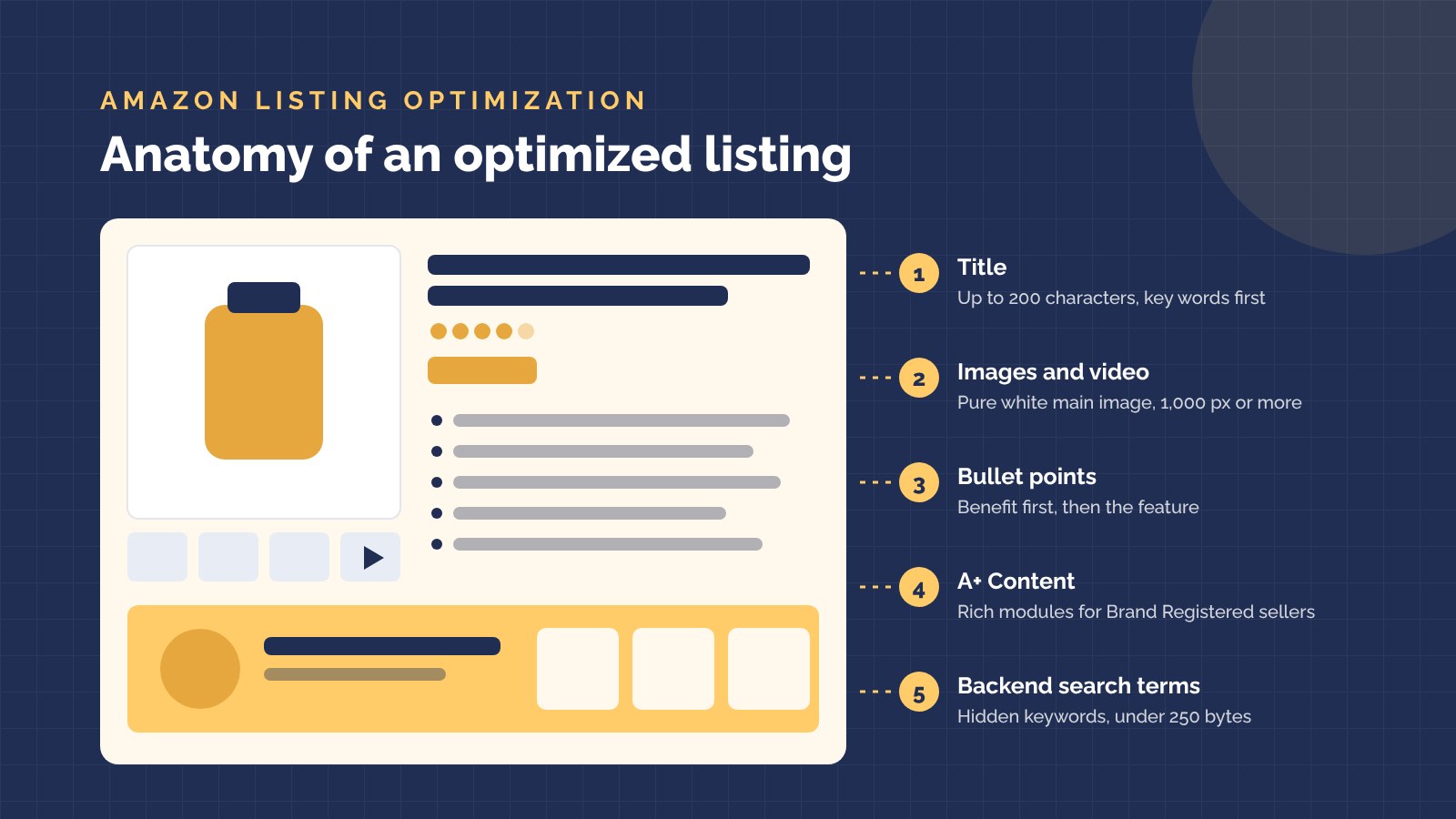
Amazon has certain rules you should follow when it comes to putting in your title requirements. For most categories, titles can be up to 200 characters, including spaces. Amazon also asks you to use numerals instead of spelling out numbers, avoid repeating the same word more than twice, leave out special characters such as !, $, and ? unless they are part of your brand name, and skip promotional phrases like "Best Seller" or "Free Shipping".
Start with your brand name, then include the specific details you discovered during keyword research, like key features, size, color, material, or quantity. Put the most important words first, since long titles get cut off on mobile.
Write strong bullet points
Bullet points sit near the top of your product page and are often the first thing shoppers read after the title. Aim for four or five bullets. Amazon allows up to 500 characters per bullet, but shorter bullets are easier to scan.
Lead each bullet with a key benefit, then back it up with the feature behind it. Leave out emojis, special characters, ASINs, and comparisons with competitors.
Work on your product description
Since the goal is to convert online searchers into buyers, you have to develop a compelling product description that is emotional and draws them in. This is why some Amazon sellers might hire copywriters for this.
You don’t want your product description to sound like an academic paper. Instead, weave a story around it and show its benefits to potential buyers.
Your product description should nail your Unique Selling Proposition (USP) while clearly conveying the product features. However, more emphasis should be on the product benefits.
You also want to pay attention to your bullet point section and provide your customers with all the product features and benefits that are relevant to them.
Fill in your backend search terms
Backend search terms are hidden keywords you add in Seller Central. Shoppers never see them, but Amazon uses them to match your product to searches. Use them for synonyms, alternate spellings, and related terms that don't fit naturally in your title or bullet points.
Keep the field under 250 bytes. Bytes are not the same as characters, and if you go over the limit, Amazon ignores the whole field. There's no need to repeat words that already appear in your title.
Use quality product visuals
When it comes to images for Amazon, beyond the quality of the shot, you should also focus on two things: playing by the platform's rules on product images and positioning your product in the shot.
For starters, your main image must have a pure white background (RGB 255, 255, 255), and the product should fill at least 85% of the frame. Use images at least 1,000 pixels on the longest side so shoppers can zoom in. Also, show the different sizes and colors of your product available in the catalog. You can also include some lifestyle images that convey the benefits of using your products.
You can take it a step further by using videos instead of images. After all, video content is now a mainstay in online content, plus buyers will be pleased to see a product in action rather than just lying static.
You can check out this ePlaybooks article to find out how you can use visuals to improve your ranking on Amazon.
Add A+ Content
A+ Content (formerly Enhanced Brand Content) lets Brand Registered sellers add extra images, comparison charts, and text modules to the product description area. It gives shoppers a fuller picture of your product and your brand, which can lift conversions. Our guide to Amazon A+ Content shows how to set it up.
Earn positive reviews
Positive reviews impact your ranking on Amazon. They also provide social proof, which increases buyer trust. Focus on earning genuine reviews from real buyers. For beginners on Amazon, you can run ads on a budget to get your product in front of customers, jumpstart your initial sales, and get your first few reviews on your product. You can also use the Request a Review button in Seller Central, or your social media platform or email, to ask customers to leave a review. Keep in mind that Amazon has strict rules on contacting customers. Be sure that you follow them carefully. Our guide on how to get authentic reviews on Amazon covers what is allowed.
An extra pro tip here is to use reviews to form a quick story on the product. You can check out the questions on your product page and those of your competitors, and use them in framing more engaging and relevant answers. This reduces the information gap and shows that your content is relevant in solving the searchers’ queries and concerns about the product.
Get your pricing right
You should be mindful of how your pricing stands against other competitors so that you don’t end up underpricing your products. Additionally, underpricing potentially can cause customers to doubt the quality of your products or even to question their authenticity. Also, consider your costs and expenses, and ensure your pricing doesn’t affect your profit.
Make sure you check out the average price of the products you have for sale on Amazon. Compare it to the prices on the product pages for other vendors. You can use repricing tools like BQool or RepricerExpress to automatically keep your prices competitive.
Optimize for mobile
A significant number of internet users access digital content and shop from their mobile devices. It’s therefore critical that you optimize your product page content for mobile viewing, this way they get a good user experience from your listing and are motivated to click and eventually buy your product.
Get active on social media
Social media has become indispensable for most business owners, regardless of their size. You can use social media to generate external traffic, especially if you’re a newbie. Platforms like Facebook, Instagram, TikTok, and X are examples of social media platforms you can take advantage of. You can get on those platforms, do a catchy product demo, share quality product images, and direct them to your Amazon product page. You can also use it to keep a pulse on what’s trending in your niche, so you won’t be left behind.
Leverage Fulfillment by Amazon (FBA)
This is one of the services Amazon offers that allows third-party sellers to sell products, but with less effort. This is because the stress of storing goods, shipping, and customer care, among others, is handled by Amazon. Fulfillment by Amazon automates the whole selling process for you. But all these come at a cost. However, it also means that your product page will be available for viewing by the millions of Amazon Prime members, which will help boost your listing.
Keep it simple
This cuts across every aspect of your listing. Don’t go overboard in your product description, or clutter the product page with product images. Also, avoid fake reviews as this could get your account flagged. By keeping it simple, searchers won’t feel overwhelmed with your product page and are more likely to click and buy.
Test and improve your listing
Listing optimization is never finished. Regularly review your listing's performance in Seller Central, including sessions, conversion rate, and search terms, and make changes where you see gaps. Brand Registered sellers can also run A/B tests on titles, images, and A+ Content with Amazon's Manage Your Experiments tool. Change one element at a time so you know what made the difference.
See also: Selling on Amazon: Amazon Listing Hijacking and How to Prevent It
Final thoughts on Amazon listing optimization
Optimizing your Amazon listing is an organic way to boost sales for your Amazon business. You can also combine it with PPC ads for faster results. However, whichever route you take, these tips will help boost your page ranking, increase conversion rate, and ultimately sales.
Need expert help? Our team at ePlaybooks knows what works and can guide you through the entire optimization process to maximize your Amazon listing performance for real results.

