Key takeaways:
- Every product variant needs its own unique SKU to enable accurate tracking across sales, fulfilment, and reporting. Without them, inventory management becomes guesswork.
- Choose a structured, alphanumeric SKU format before adding your first product, document it, and enforce it across your entire team. Inconsistency is harder to fix at scale, so you want to start right.
- From warehouse picking and POS transactions to multi-channel syncing and supplier purchase orders, SKUs are the common language that ties your entire business together.
- Duplicate SKUs, recycled codes, spaces, special characters, and missing SKU documentation are the most common culprits behind inventory disasters. Carry out regular audits to prevent this.
Every thriving Shopify store has an invisible backbone holding it upright. Whether you sell ten products or ten thousand, understanding SKUs is the difference between a store that scales gracefully and one that collapses.
Stock Keeping Units (SKUs) are the backbone of modern retail, invisible to customers but indispensable to every merchant who wants to stay on top of their business.
This ePlaybooks guide breaks down what SKUs are, why they matter, and how to create effective SKUs for your Shopify store.
What is a SKU?
The term "SKU" stands for Stock Keeping Unit. It is an internal identifier created by a retailer or brand to distinguish one product variant from another at the lowest level. Think of it as a product's fingerprint within your store.
Unlike a product name or description, a SKU is compact, machine-readable, and precisely structured. It encodes meaningful information, category, colour, size, and style into a short code that your warehouse staff, software systems, and fulfilment partners can all interpret instantly.
On Shopify, SKUs are inside a product's variant settings. Each variant, a unique combination of options such as size, colour, or material, can and should have its own distinct SKU. This is what allows Shopify to track stock accurately at the variant level rather than lumping all sizes of a product together under a single umbrella.
Characteristics of a SKU
Not every product code is a SKU. A SKU has a specific set of properties that make it functional in a real-world inventory environment:
- Uniqueness
The single most critical rule is that every SKU must be unique. No two products or variants in your catalogue should ever share a SKU. Duplicate SKUs cause inventory mismatches, shipping errors, and accounting nightmares. Shopify enforces this within a single store.
- Internal and custom-made
A SKU is defined by the merchant, not by a governing body. You decide the format, the length, and what information it encodes. This flexibility is powerful, but it also means that inconsistency is your own fault. Once you pick a format, stick to it across your entire catalogue.
- Readable and alphanumeric
SKUs combine letters and numbers, keeping them compact while remaining human-readable. Avoid special characters such as slashes, ampersands, or spaces, as they break URLs, confuse spreadsheet software, and cause import errors across platforms.
- Granular
A SKU applies to a single, specific item variant. A navy blue polo shirt in size “Large” has a different SKU than the same shirt in size “Medium”. This granularity is what makes precise inventory tracking possible.
Why are SKUs important for inventory management?
SKUs appear at every touchpoint where a product moves, is counted, or is sold. Without SKUs, inventory management becomes guesswork. You may know that you have 47 "blue shirts" in stock, but which blue? Which size? Which shade? A structured SKU system answers these questions instantly, at every point in your supply chain. This is especially important when you're learning how to manage your Shopify inventory effectively. As product variants multiply quickly, a single mislabeled SKU can throw off your entire stock count.
- Inventory tracking and control
Shopify updates stock quantities at the SKU level every time a sale is made, a return is processed, or a purchase order is received. When an item goes out of stock, it is the SKU that triggers a low-stock alert or disables the "Add to Cart" button. This precision prevents overselling, a problem that leads directly to cancelled orders and unhappy customers.
- Fulfilment and warehousing
In a warehouse or fulfilment centre, pickers use SKUs to locate the correct item on a shelf. Many warehouses assign physical bin locations by SKU. This eliminates ambiguity and reduces pick-and-pack errors.
- Point of Sale (POS)
Shopify POS uses SKUs to ring up items accurately in physical retail environments. Staff can search by SKU on a tablet, barcode scanners can decode SKUs from printed labels, and the system reconciles in-store sales with your central Shopify inventory in real time.
- Sales reporting and analytics
SKUs allow you to filter reports by a single variant. You can identify which specific size or colour of a product is your top seller, which variants are sitting unsold for 90 days, and where to focus your next purchase order. This kind of variant-level insight is impossible without a consistent SKU system.
- Multi-channel selling
If you sell on Shopify, Amazon, eBay, and a wholesale marketplace simultaneously, SKUs are the common language that ties them together. Your inventory management software uses SKUs to synchronise stock counts across all channels, ensuring that selling the last unit of a product on Amazon also removes it from your Shopify storefront.
- Purchasing and reordering
Purchase orders sent to suppliers reference SKUs. When a shipment arrives, the receiving staff scans or enters SKUs to book stock back into the system accurately. Reorder triggers in Shopify or connected apps fire based on SKU-level stock thresholds.

Benefits of SKUs
The return on investment from a SKU system is measured in fewer errors, faster operations, and better business decisions.
- Reduced inventory errors
Human error in picking, packing, and shipping is inevitable, but SKUs make errors detectable and correctable. When every item carries a unique identifier, any mismatch is caught immediately. Stores without SKUs can ship incorrect items for weeks before anyone notices.
- Faster fulfilment
A warehouse worker who can scan a barcode encoding a SKU and be immediately directed to the correct bin location works far faster than one who must read and interpret a full product name. Speed and accuracy with hundreds of orders per day result in significant cost savings.
- Smart purchasing decisions
SKU-level sales data tells you exactly which products to reorder, in what quantities, and when. You stop tying up capital in slow-moving variants and invest it in the sizes and colours that actually sell. This alone can meaningfully improve cash flow and gross margin.
- Scalability
A store with ten products does not need a sophisticated SKU system. A store with a thousand products does. Building a good SKU system early means your infrastructure scales with your growth rather than collapsing under it. Adding new products to a well-structured system is frictionless.
- Seamless integrations
Shopify integrates with dozens of apps from ERP systems, 3PL software, accounting platforms, and dropshipping tools, all of which communicate through SKUs. A clean SKU system is a prerequisite for most serious integrations. Without it, data from third-party tools cannot be matched back to your Shopify products reliably.
- Better customer experience
SKUs power the back-end accuracy that customers experience as: receiving the right item, seeing accurate stock availability, and getting timely shipping confirmations. The customer never sees the SKU, but they feel its presence in every order that goes right.
How to set up and manage SKUs for a profitable store
Building a SKU system is not complicated, but you need to be intentional with your designs before you add your first product. Here is a practical, step-by-step approach to setting up and managing SKUs:
Step 1: Decide on a SKU format
First, you want to decide on a format. A good SKU naming has meaning in a consistent, predictable order. Common components include the category, subcategory, and attributes.
For example: [Category]-[Subcategory]-[Attribute 1]-[Attribute 2]-[Seq]
APP-POL-NVY-L-042 (Apparel, Polo, Navy, Large, #42)
Keep it readable but concise. Aim for codes that a warehouse worker can glance at and interpret correctly.
Step 2: Map your product attributes
List every attribute that creates a distinct variant in your catalogue, from size to colour, material, scent, weight, fit, and season. Each attribute becomes a component in your SKU structure. Document your abbreviation standards. For example, BLK for black and NVY for navy. Make that document the single source for everyone on your team.
Step 3: Enter SKUs in Shopify
Once you’ve set up your SKU, navigate to Products → Add Product
In your Shopify admin, go to the Products section and open a product (new or existing).
Scroll to the variants section.
If your product has no variants, the SKU field appears under Inventory. If you have variants enabled, each variant row has its own SKU field.
Enter a unique SKU for each variant.
Following your SKU format, type the SKU code directly into the SKU field. Shopify will warn you if you enter a duplicate.
Enable inventory tracking
In the Inventory section, toggle "Track quantity" on. This activates the stock-level tracking that makes SKUs actionable.
Set stock quantities
Enter your on-hand stock for each variant. This becomes your starting point for all inventory movements.
Step 4: Use bulk editing for large catalogues
For stores with many products, entering SKUs one by one is not practical. Shopify supports bulk product CSV imports. Prepare your SKUs in a spreadsheet, map them to the correct CSV columns, and import them. This can help you populate SKUs for hundreds of variants at once. Always test with a small batch first.
Step 5: Print barcode labels
Shopify's native barcode printing features, or Shopify apps like Shopify Flow, Stocky SKU IQ, can generate barcode labels based on your SKUs. Attaching these to physical products or shelving closes the loop between your digital inventory and your physical stock.
Step 6: Audit regularly
SKU management is continuous process. Schedule quarterly SKU audits. Verify that all active variants have a SKU, check for accidental duplicates, and retire SKUs for discontinued products by archiving, not deleting, those product records to preserve historical sales data.
Step 7: Maintain a SKU document
Keep a living spreadsheet or database that records every SKU in your system alongside its full product description, attributes, supplier reference, and location code. This master document is your fallback when systems fail and your onboarding resource when staff join your team.
You can check out our guide on the best Shopify inventory management apps for tracking SKUs.
Common SKU mistakes to avoid
Most inventory disasters are not caused by complex problems. They are caused by simple, avoidable mistakes in SKU management. Here are the most common ones:
- Using product names as SKUs: Instead, create coded identifiers. Product name changes, but SKUs should not.
- Including spaces or special characters: Instead, stick to letters, numbers, and hyphens only. Validate before importing.
- Reassigning SKUs to new products: Remove old SKUs permanently. Never recycle them, even for similar products.
- SKUs that are too long or cryptic: You want to use cap codes at 16 characters. A SKU nobody can read in a warehouse is useless.
- Duplicate SKUs across variants: Audit for duplicates after every bulk import. Use Shopify's duplicate warnings.
- Inconsistent SKU format: Document your format before creating a single SKU. Enforce it across the team.
- No SKU document: You want to maintain a single SKU master document outside of Shopify as a backup and reference.
SKUs vs. other product identifiers
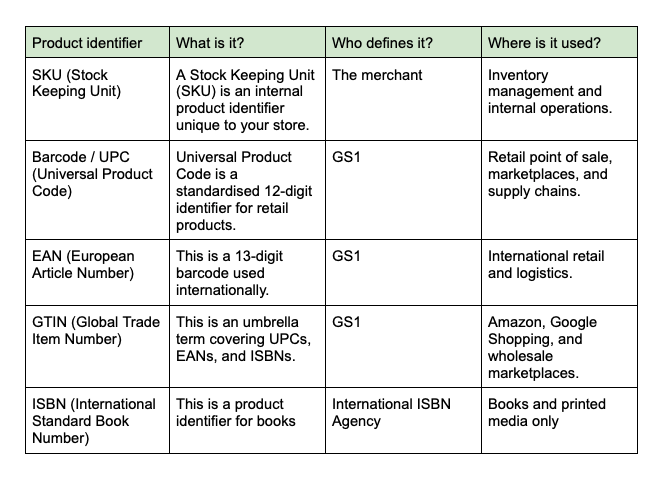
SKUs are frequently confused with other product codes. Understanding the differences prevents integration errors and compliance hiccups.