

Key takeaways
- Inbound placement fees are tied to Amazon’s logistics routing decisions, where sellers are charged when they ship inventory to fewer fulfillment centers and let Amazon redistribute stock across its network.
- Three main placement options determine your costs: minimal shipment splits (convenient but most expensive), Amazon-optimized splits (no-fee but operationally stricter), and partial splits for bulky items at reduced fees.
- Fees vary based on multiple factors, including product size and weight, shipment split method, inbound location, and inventory distribution across Amazon’s fulfillment network.
- Sellers can actively reduce fees through better planning and tools, especially by using Amazon-optimized splits, improving shipment consolidation, and leveraging the Revenue Calculator for cost comparisons.
- Efficient inventory management is key to cost control, as accurate forecasting and smarter stocking reduce rushed shipments, help avoid unnecessary fees, and improve overall FBA profitability.
As an Amazon seller, you may incur Inbound Placement Fees when sending inventory to Amazon’s fulfillment centers under the Fulfillment by Amazon (FBA) program.
This fee is part of Amazon's logistics process, which manages how and where inventory is placed across its vast network of warehouses and fulfillment centers.
Understanding what and how Amazon’s inbound placement fees work is one key to making smart logistics decisions that impact your Amazon business positively.
In this ePlaybooks article, we will explore all you need to know about Amazon’s new inbound placement fees, how to calculate inbound placement fees, and most importantly, how you can reduce inbound placement fees. We have a full breakdown of Amazon FBA fees in 2026 if you want to know more about Amazon fees.
What is Amazon’s inbound placement fees?
When you send your inventory to Amazon, the company may direct you to ship to one or multiple fulfillment centers based on factors such as demand patterns (where customers are likely to order the product) and inventory levels across fulfillment centers.
The new inbound placement fee is a charge implemented by Amazon for sellers using FBA who choose to bypass Amazon's default placement plan and instead want to ship their entire inventory to a single fulfillment center. Then, Amazon distributes their inventory across its network. This fee is calculated based on the size, weight, and destination of items sent to Amazon's warehouses. This helps to improve delivery speed while reducing shipping costs. The fee applies to both standard-size and oversized items and is charged 45 days after Amazon receives the shipment.
Amazon’s inventory placement options
Amazon allows you to choose between two inventory placement options: Minimal shipment splits or Partial/Amazon-optimized shipment splits.
Minimal shipment splits.
With minimal shipment splits, you can send your inventory to a single inbound location at a cost. Amazon will then distribute your inventory across its network for you. Depending on the inbound location, the cost may vary. Shipments sent to Western locations typically incur higher fees compared to other locations.
Amazon-optimized shipment splits
This is Amazon’s no-fee inventory placement option, but it comes with stricter shipping requirements. Sellers must send inventory to multiple inbound fulfillment centers, with each shipment containing at least five identical cartons or pallets per SKU. Every carton or pallet must have the same quantity and identical item mix.
Partial shipment splits
Designed specifically for large bulky products, this option allows sellers to send inventory to fewer locations than the Amazon-optimized option while paying a reduced inbound placement fee. It offers a middle ground between cost savings and operational convenience.
Important 2025 updates sellers should know
Lower fees for large bulky products
Starting January 15, 2025, Amazon reduced inbound placement service fees for large bulky-size products by an average of $0.58 per unit under the minimal shipment split option, helping sellers improve margins on oversized inventory.
FBA new selection fee exemption
Until March 31, 2025, new parent ASINs enrolled in Amazon’s FBA New Selection Program qualify for an inbound placement fee exemption on up to 100 units per new parent ASIN, provided the shipment was created on or after December 1, 2024.
Partial shipment splits removed for standard-size products
As of February 20, 2025, sellers can no longer use the partial shipment splits option for standard-size products when creating new shipping plans, leaving this option exclusively available for large bulky inventory.
How to select your Amazon inventory placement option via Amazon Seller Central
Here’s how you can select your Amazon inventory placement option via your Amazon Seller Central account:
- First, log in to your Amazon Seller Central account and navigate to the "Settings" section.
- Select "Fulfillment by Amazon" from the left sidebar menu.
- Under "Inbound Settings," click on "Edit".
- Scroll down to find the "Inventory Placement Option" section.
Here, you'll see the current inventory placement setting. There are generally three options to choose from:
- Default: This is Amazon's standard option, where they decide how to distribute your inventory across multiple fulfillment centers.
- Inventory placement service: This allows you to send all your inventory to one fulfillment center, which Amazon then distributes.
- Distributed inventory placement: This option gives you more control over where your inventory is placed.
You can check out our guide on how to ship to Amazon FBA correctly.
Factors that affect inbound placement options
Some factors can affect the inbound placement options available. These include:
Item size and weight
The size and weight of your item can affect your inbound placement options. Sizes include small standard items (up to 15x12x0.75 inches, weighing 16 oz or less), large standard items (over 15x12x0.75 inches but under 59x33x3 inches, weighing more than 16 oz but less than 50 lbs), and large bulky items (over 59x33x3 inches or weighing 50 lbs or more). Extra-large-sized products are exempt from the inbound placement service fee.
Product type and quantity
Availability of inbound placement options depends on product types, quantities, existing inventory levels across the Amazon Fulfillment Network, and customer demand location.
To qualify for certain options, you need to meet certain minimum quantity thresholds.
Shipping plan creation
When creating a shipping plan, you'll receive a fee estimate for each available inbound placement option. The Amazon FBA inbound placement service fee is charged 45 days after your shipment is received, based on quantities received as well as inbound location.
The fee structure and availability may change over time, so it's important to check Amazon's official documentation for the most up-to-date information.
How to calculate Amazon’s inbound placement fees
The inbound placement service fee is calculated based on several factors:
- Item classification: Items are categorized as standard size or oversized.
- Weight: For small standard items, the fee is based on unit weight. For large standard and bulky items, it's based on the greater dimensional weight or unit weight.
- The number of locations tier: The fee varies depending on whether you choose minimal, partial, or Amazon-optimized shipment splits.
- Inbound location: Shipments sent to western locations typically incur higher fees than other locations within the country.
Using these factors, Amazon calculates your inbound placement fees for placing your inventory strategically.
Using Amazon’s revenue calculator
Amazon’s revenue calculator is a tool that helps sellers estimate the true cost of selling on Amazon by factoring in expenses like referral fees, fulfillment costs, storage charges, and projected profit margins.
Amazon has integrated inbound placement service fee calculations into the tool, allowing sellers to estimate shipping costs before creating an FBA shipment. Sellers can enter product details, compare different inventory placement options, choose fulfillment regions such as East, West, or Central, and calculate per-unit fees based on shipment volume.
This makes it easier to compare shipping strategies, understand how inbound placement fees affect profitability, and make smarter inventory decisions before sending products into Amazon’s fulfillment network.
How it calculates inbound placement fees
Here’s how it works:
- Enter product information: Input the SKU or product details, including size tier, dimensions, and weight. This allows the calculator to determine the correct fee structure for your inventory.
- Choose an inventory placement option: Select the shipping option Amazon offers, such as: Minimal shipment splits, Amazon-optimized shipment splits, and Partial shipment splits.
- Select fulfillment center region: Choose the inbound destination region, typically East, West, and Central. Different regions can affect shipping logistics and cost estimates.
- Input shipment quantity: Enter the number of units or bulk shipment volume. The calculator estimates the per-unit inbound placement fee based on your shipment size.
- Review profitability: The tool then shows you how inbound placement fees affect your overall margins alongside other Amazon selling costs, helping you decide the most cost-effective shipping strategy.
A breakdown of Amazon’s new inbound placement fees
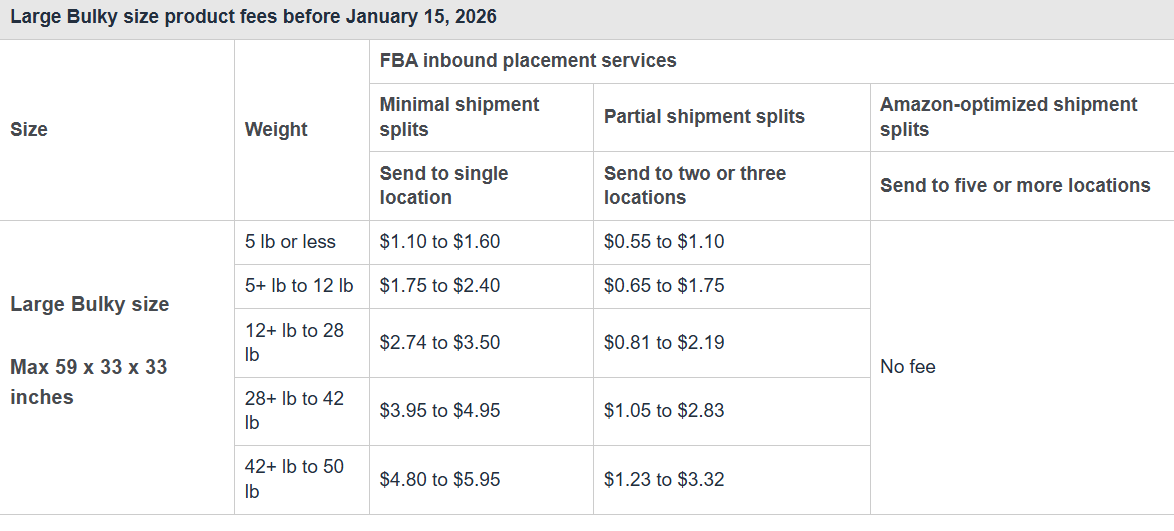
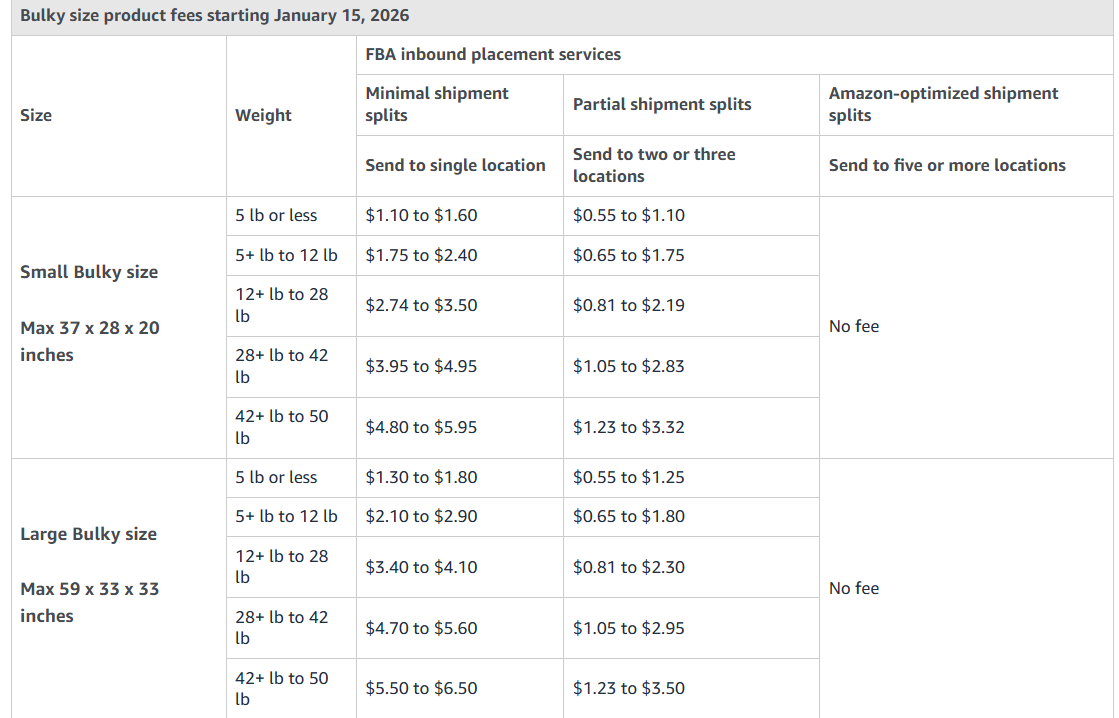
Here is a breakdown of Amazon’s latest inbound placement fees. These fees apply to products sent to Amazon's fulfillment centers:
Standard-sized fees


Large bulky-size fees
How to reduce Amazon’s inbound placement fees
With the new inbound placement fees, many sellers are looking for ways to reduce their costs. Here are some strategies that will help you reduce Amazon’s inbound placement fees:
- Understand the fee structure
Before implementing any reduction strategies, it's crucial to first understand how the fees are calculated. Your fees will vary based on your item size, weight, shipment split options, and inbound location.
- Use Amazon-optimized shipment splits
The most direct way to avoid inbound placement fees is to use Amazon-optimized shipment splits, where inventory is sent to multiple fulfillment centers. While it requires more logistical effort on your end, it usually comes with zero placement fees, making it the most cost-efficient option at scale.
- Avoid minimal shipment splits when possible
Minimal splits (sending to one location) are the most convenient but typically the most expensive. Use them only when operational simplicity is more important than cost control or when margins can absorb the fees.
- Merge shipments
One way to reduce costs and save money is to group similar products in larger shipments. You can combine related items into single shipments whenever possible.
Also, you can consider increasing order quantities to reach minimum thresholds for reduced fees. Use Amazon's Revenue Calculator to estimate costs for different shipment sizes.
- Utilize Amazon's Revenue Calculator
Amazon's Revenue Calculator is a powerful tool for optimizing your shipping strategy. Simply input your product details, including size, weight, and quantity. Compare different shipment split options and their fees and adjust your strategy based on the estimated costs.
- Classify your items properly.
Classifying your products effectively is one way to reduce inbound placement fees. Ensure you accurately categorize your items as standard size or oversized. For small standard items, focus on minimizing unit weight to reduce per-unit fees. For larger items, optimize dimensional weight calculations to lower fees.
- Optimize inbound location
While this may not always be possible, choosing the right inbound location can impact fees.
Shipments sent to eastern locations often incur lower fees compared to western locations. You can consider the trade-off between faster shipping times and cost savings when deciding on inbound locations.
- Implement efficient inventory management.
Effective inventory management strategies can indirectly reduce fees and significantly support improving your FBA inventory planning. Maintaining optimal stock levels helps you avoid unnecessary or rushed shipments that can increase costs. Use Amazon’s inventory management tools to accurately track stock levels, forecast demand, and prevent overstocking or stockouts. You can also apply just-in-time ordering practices to keep inventory lean while ensuring consistent availability, ultimately improving efficiency and reducing fulfillment-related expenses.
- Take advantage of promotions.
Amazon occasionally offers promotions, so ensure you stay informed about the latest promotions and special offers. Consider joining Amazon's Seller Central forums to stay updated on potential fee reduction opportunities.
Final thoughts
Amazon’s inbound placement fee is Amazon’s way of optimizing its logistics network while encouraging sellers to adopt cost-efficient shipping practices. While these fees can stack up to your overall costs, they also offer an option for convenience in managing inbound shipments.

