


Key takeaways
- To sell on Walmart effectively, you need to monitor and understand your seller metrics. They keep your account in good standing and show whether you are delivering the customer experience Walmart expects.
- Walmart's current seller performance standards cover eight metrics: Cancellation Rate, On-Time Delivery Rate, Valid Tracking Rate, Seller Response Rate, Negative Feedback Rate, Return Rate, Item Not Received Rate, and Late Shipment Rate.
- Accounts that miss a standard and do not act may face suppression, suspension, or termination, so check the Performance dashboard in Seller Center often.
- Your Listing Quality score (content, price, shipping, availability, and reviews) affects visibility and unlocks programs like the Pro Seller badge.
- To improve your metrics, keep prices competitive, optimize listings, manage inventory, ship on time, run regular account health audits, and provide excellent customer service.
Not too long ago, the idea of selling products online felt like something out of the future. Today, however, technology has made it easier than ever for business owners to launch and grow online stores.
The Walmart Marketplace has quickly become a powerful channel, giving sellers access to Walmart's huge US customer base and the opportunity to significantly boost sales and profitability. Staying in good standing, though, takes more than listing products and fulfilling orders. Walmart holds sellers to strict performance standards, and accounts that miss them risk warnings, restrictions, or suspension.
But how can a seller track performance and grow on the Walmart online marketplace? What if you could clearly see what your customers want, which products are selling fastest, and which strategies are actually driving revenue?
To sell products on Walmart effectively and stand out from the competition, you need to monitor and understand your Walmart seller metrics.
This ePlaybooks guide covers the metrics Walmart measures, where to find them, and how to improve them and protect your account from suspension.
Why do you need Walmart seller metrics?

The Walmart online marketplace offers a wide range of products to customers. Thanks to its innovative features, the platform gives customers a world-class shopping experience. Likewise, if you are selling on Walmart, you have access to the platform's large customer base and features that help you increase sales and revenue.
Better performance and sustainability
With Walmart seller metrics, you can maintain the right standing with Walmart. Using data from your metrics, you can evaluate performance to ensure you are not selling below standard. If you are struggling with certain metrics, it may indicate that you need to improve operations, such as inventory management, order fulfillment, or customer service. Addressing these issues can lead to better performance and sustainability.
Meet customer expectations
Not only does it help you maintain the right standing with Walmart, but it also ensures you are ticking all the boxes for great customer service. High-performing sellers on the Walmart marketplace are those who consistently deliver quality products on time and provide excellent customer service. By following Walmart's performance metrics, you can ensure you meet your customers’ expectations. This will help you attract new customers and retain repeat customers. It will also help you spot areas of your business that you need to work on to increase sales on Walmart.
More effective Walmart advertising
With Walmart seller metrics, your Walmart advertising can become more strategic and effective. By tracking key metrics related to your sales performance and customer behavior, you can make data-driven decisions to optimize your advertising strategies. Ultimately, this can lead to higher ROI, making your advertising efforts on the Walmart Marketplace more profitable.
Increase buyer confidence
Strong seller metrics reassure shoppers that they are buying from a reliable seller. Fast, accurate deliveries and good ratings build customer trust and loyalty.
Improve visibility
Walmart's Listing Quality score takes into account shipping speed, in-stock rate, and ratings and reviews, and Walmart says quality listings boost product visibility. Good operations therefore help your products get seen.
Avoid penalties
If your account fails to meet a performance standard and you do not take action, Walmart says it may suppress your listings, suspend your account, or terminate it. Watching your metrics lets you fix problems before they reach that point.
Walmart seller performance standards
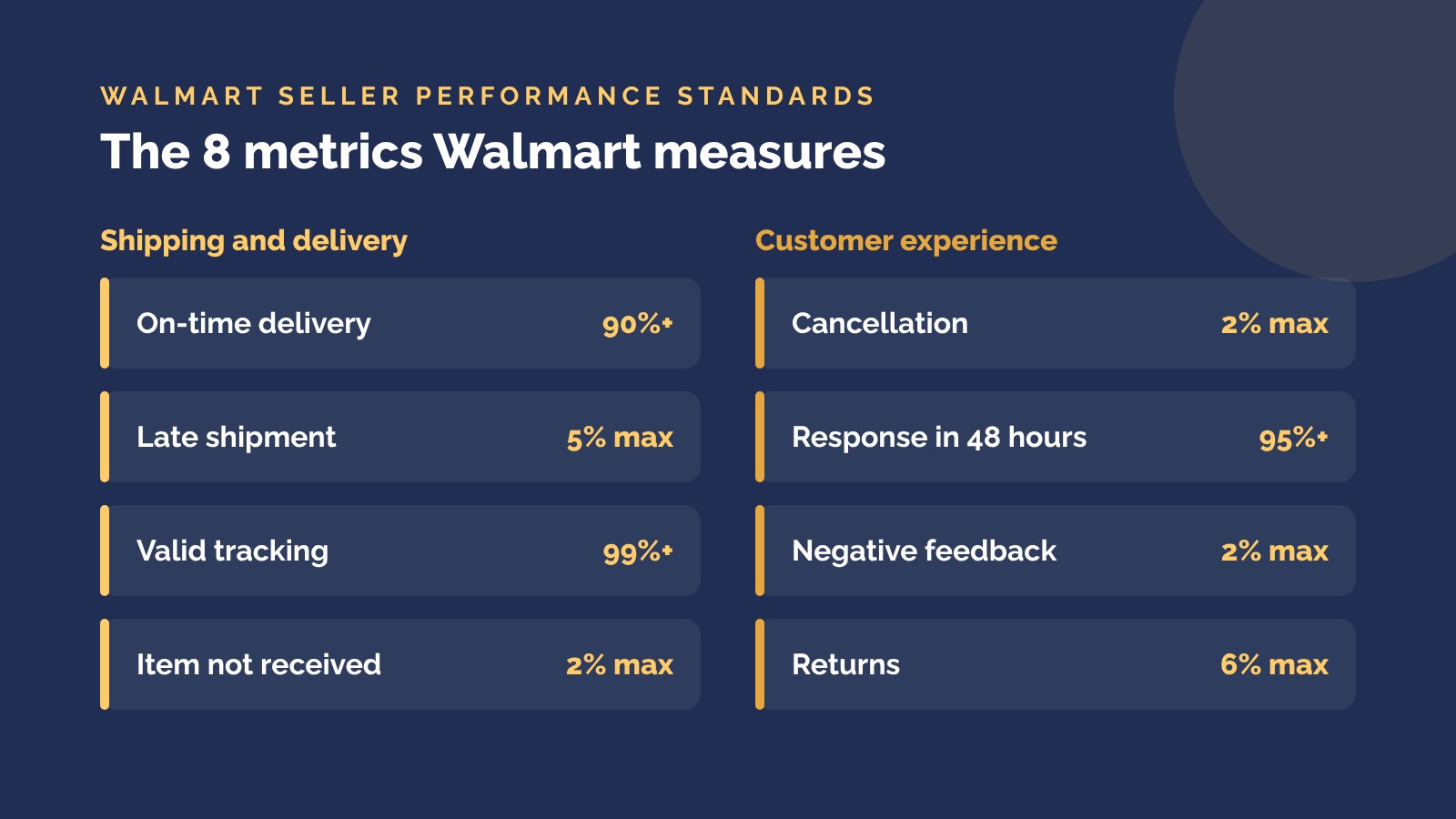
Walmart's seller performance standards show how well you are meeting Walmart's expectations as a seller. Knowing where you stand is key to good customer service and an all-around successful business on Walmart. Walmart evaluates the standards over the last 30 or 60 days, and they are subject to change, so check the current list in Seller Center. Here are the standards Walmart lists today:
| Metric | What it measures | Standard |
|---|---|---|
| Cancellation Rate | Orders canceled by the seller after receiving them from Walmart | 2% or below |
| On-Time Delivery Rate | Orders delivered on or before the Expected Delivery Date | 90% or above |
| Valid Tracking Rate | Orders with valid tracking information | 99% or above |
| Seller Response Rate | Customer inquiries answered within 48 hours | 95% or above |
| Negative Feedback Rate | Orders sold in the past 60 days that get a one or two star rating (WFS sellers are not measured) | 2% or below |
| Return Rate | Orders delivered in the past 60 days that customers returned | 6% or below (9% or below for resold items) |
| Item Not Received Rate | Orders expected to arrive in the past 60 days that were not delivered | 2% or below |
| Late Shipment Rate | Orders shipped after the Expected Ship Date | 5% or below |
Older guides often talk about a single Order Defect Rate (ODR). Walmart's current standards break customer problems out into the separate metrics above, such as cancellations, returns, negative feedback, and items not received, so you can see exactly which part of your operation needs work.
Cancellation Rate
Canceling an order after Walmart receives it counts against you. Common reasons sellers cancel orders are pricing errors, listing errors, and out-of-stock inventory. To avoid canceling orders and disappointing customers, make sure your listings are accurate and your prices and stock levels stay in sync. Monitor your inventory levels and avoid overstocking or understocking.
On-Time Delivery Rate
Walmart calculates an Expected Delivery Date (EDD) for every order based on your shipping settings, and it holds you responsible for meeting it. Late hand-overs to the carrier and late shipments are the main drivers of this metric, so monitor and assess the performance of your shipping providers.
Late Shipment Rate
Once you get an order from Walmart, it comes with an Expected Ship Date (ESD). This date is the deadline for you to ship the order and provide tracking information. Your Expected Ship Date is calculated from your Order Cutoff Time and Fulfillment Lag Time. Keep your Late Shipment Rate at 5% or below by streamlining your order fulfillment process, using reliable shipping carriers, and setting handling times you can actually meet.
Valid Tracking Rate
Your Valid Tracking Rate should be 99% or above. Once a customer places an order, Walmart expects you to confirm the order and add valid tracking information so the customer can follow its status. Invalid tracking numbers and missing carrier scans hurt this metric. Walmart uses order confirmation and tracking data to support customers, so if you ship an order without uploading tracking, you risk customer contacts, refunds, and a weaker performance record.
Seller Response Rate
Walmart expects you to respond to at least 95% of customer inquiries within 48 hours of receiving them. Check your messages every day and keep templates ready for common questions about shipping, returns, and product use.
Negative Feedback Rate
This metric tracks the share of orders that receive a one or two star customer rating. When customers are unhappy with your product or service, it shows up here. To keep it at 2% or below, focus on product quality, accurate listings, careful packing, and fast, friendly customer service.
Return Rate
Product returns are common when selling on Walmart. However, you can reduce your return rate with detailed product listings, accurate product images, and consistent product quality. Clear sizing information and specifications help customers buy the right item the first time.
Item Not Received Rate
This metric counts orders that never reached the customer. Use reliable carriers, ship with tracking, and pack items securely so they arrive in good condition and on time.
How to monitor your performance on Walmart Seller Center
Walmart Seller Center provides tools that let you monitor your seller metrics and overall performance. You can also check your metrics in the Walmart Seller app or pull them through Walmart's Seller Performance APIs. Here is how to review them:
Log in to Walmart Seller Center
Sign in to your seller account and open the Performance dashboard. This is where Walmart shows your performance against each standard, along with recommendations.
Review your seller metrics
Pay close attention to your Cancellation Rate, On-Time Delivery Rate, Valid Tracking Rate, Return Rate, and customer feedback. Look for trends or patterns over time to spot areas that need improvement, and download the related reports to find the orders behind a problem.
Check fulfillment metrics
Fulfillment reports cover both Walmart Fulfillment Services (WFS) and seller-fulfilled orders and help you find orders that missed fulfillment expectations.
Check your Listing Quality dashboard
The Listing Quality page in Seller Center shows how optimized your listings are at the catalog and item level, with recommendations for improvement.
Monitor notifications and alerts
If your account fails to meet a standard, Walmart notifies you by email and in Seller Center. You cannot unsubscribe from these notifications, so read them as soon as they arrive and act quickly so small issues do not turn into suspensions.
Review item reports
Generate an item report to review your products in detail, including inventory and listing status.
Monitor customer feedback and reviews
Check item reviews and seller reviews regularly. Respond to negative feedback and fix the issues behind it. Positive reviews contribute to a better reputation and stronger seller metrics.
If performance problems lead to a suspension or suppression, Walmart's seller performance standards page explains how to appeal. Act fast and keep good records so you can show what went wrong and how you fixed it.
Sales and catalog reports
The Sales Insights page in Seller Center shows your gross merchandise value (GMV), units sold, orders, and average unit retail (AUR). It has three views: Account Sales Report, Item Sales Report, and Sales By Department.
You can use the data to make weekly, monthly, and yearly comparisons to understand changes in sales performance.
The Reports dashboard groups Walmart's downloadable reports into Sales, Catalog, Pricing, Orders, Fulfillment, Assortment, and Other. You can schedule reports to run automatically and go back to reports you downloaded before.
Buy Box metrics
With the Buy Box report, you can see how your offers compare with the sellers winning the Buy Box, including their item price and shipping price. We recommend pricing at or below the Buy Box winner where your margins allow. You can generate the Buy Box report from the Reports dashboard in Seller Center.
Walmart looks at both your item price and your shipping fee. If your price is far above recent prices for the same item on Walmart.com or competing sites, Walmart automatically unpublishes the offer and the item report shows the reason "Reasonable Price Not Satisfied." If your price is substantially higher but not that extreme, your offer can lose Buy Box eligibility. Besides price, the Buy Box also weighs shipping speed and cost, in-stock rates, listing content, and the post-purchase customer experience.
Items metrics
With the item report, you can review details for each product, such as reviews, inventory, and listing status.
Walmart's performance standards do not set a minimum product rating, but the Negative Feedback Rate counts one and two star ratings. We recommend keeping a rating of 4 stars and above and building a solid number of reviews for each item.
If your inventory count falls to zero, you are out of stock. Being out of stock costs you sales and Buy Box wins, and in-stock rate is part of your Listing Quality score. Set a restock point above zero so you reorder before you run out.
Listing Quality score and the Pro Seller badge
Another critical part of selling on Walmart Marketplace is the quality of your product listings. Walmart's Listing Quality score measures how optimized and competitive your listings are, at both the catalog and item level. The catalog score is an average of your item scores, and you can find it on the Listing Quality page in Seller Center.
What affects your Listing Quality score
- Content quality: your item name, description, key features, and images.
- Price competitiveness: how your price compares with similar products on other marketplaces.
- Shipping: the delivery speed you promise across ZIP codes.
- Published and in stock: how available your items were over the last seven days.
- Ratings and reviews: your review count and average rating.
To improve your score, focus on complete product information, high-quality images, competitive pricing, fast shipping, and healthy inventory levels. See our guide to Walmart Marketplace SEO for listing tips.
Pro Seller badge requirements
Strong metrics and listings can earn you the Pro Seller badge, which comes with perks such as a 10% referral fee discount on qualified listings, access to Flash Deals, and faster payouts. Walmart lists these requirements:
| Metric | Requirement |
|---|---|
| On-time delivery rate | 95% or above |
| Cancellation rate | 1.5% or below |
| Seller responsiveness rate | 95% or above |
| Shipping speed score | 50% or above |
| Content quality score | 75% or above |
| Price competitiveness score | 75% or above |
Walmart notes that using Walmart Fulfillment Services can help you meet the delivery, cancellation, responsiveness, and shipping speed requirements.
How to improve Walmart seller metrics for better performance

If your Walmart seller metrics are just not picking up, you may be missing out on a few things. Here are a few tips to help you boost your seller metrics and improve performance, sales, and revenue. For more ideas, see our Walmart selling strategies.
Evaluate pricing
To win the Buy Box, you may need to lower your prices. Use the Buy Box report and Pricing reports to check competitor prices, compare them with yours, and adjust accordingly. Free shipping can also increase your chances of winning the Buy Box. Monitor competitor pricing often, use automated repricing where it makes sense, factor marketplace fees into your prices, and avoid sudden extreme price swings.
Optimize your listing
To increase traffic to your listing, use the right keywords in your product title and description. Use high-quality product images to attract buyers to your product page. Make sure all your product listings are accurate and up to date. Incorrect prices or misleading information can lead to cancellations and returns, which hurt your seller metrics.
Manage inventory properly
Make sure items are always in stock, ready to ship, and delivered on time. Overselling products you do not have is one of the fastest ways to damage account health, because it forces cancellations. To avoid this:
- Use inventory management software to sync stock levels in real time.
- Audit inventory counts regularly.
- Set inventory buffers to avoid accidental overselling.
- Remove unavailable products immediately.
Improve your order processing and fulfillment
To keep your On-Time Delivery Rate, Late Shipment Rate, and Valid Tracking Rate healthy, streamline your fulfillment process:
- Set realistic handling times for your products.
- Partner with reliable shipping carriers.
- Automate fulfillment workflows where possible.
- Upload tracking information immediately after shipment.
- Ship every order by the Expected Ship Date.
Many sellers improve shipping performance with Walmart Fulfillment Services (WFS), which lets Walmart handle storage, packing, and delivery.
Provide good customer service
To attract repeat customers and earn good reviews and ratings, keep your customer service strong. Respond to inquiries within 48 hours, process refunds quickly when needed, resolve complaints professionally, and monitor buyer feedback regularly. Fast, proactive support stops disputes from turning into formal account issues.
Handle refunds and returns efficiently
Make your return policies clear to customers, and process returns and refunds promptly so customers stay satisfied. This keeps your Return Rate and Negative Feedback Rate in check.
Regularly evaluate your performance
Use Walmart's Performance dashboard to track your seller metrics and identify any areas that need attention. You can also use analytics tools to get deeper insights into your performance.
How to protect your Walmart account from suspension

A suspended account can disrupt cash flow, damage your brand, and take weeks to recover from. The good news is that most suspensions are preventable when you understand Walmart's rules and manage account health actively.
Conduct regular account health audits
Many sellers wait until Walmart sends a warning before reviewing account health. A better strategy is a weekly checklist: review your performance metrics, check inventory accuracy, monitor customer complaints, and read policy updates from Walmart. Preventive monitoring helps you spot risks early.
Have a suspension recovery plan ready
Even careful sellers can face account issues. Preparing ahead reduces downtime if problems arise. A strong recovery plan includes:
- Documented operational processes.
- Organized shipment and inventory records.
- A record of all customer service interactions.
- A clear root cause analysis if you need to appeal.
Having these documents ready improves your chances of getting your account reinstated.
Stay compliant with Walmart policies
Policy violations related to product listings can trigger account warnings. Walmart requires accurate, compliant listings. Common mistakes include misleading product titles or descriptions, incorrect product categories, duplicate listings, prohibited or restricted products, and unauthorized branded content or copyrighted images. Review Walmart's product guidelines regularly and make sure every listing stays compliant.
Grow your business with Walmart seller metrics
To successfully scale on the Walmart Marketplace, you need to make data-driven decisions. Monitoring your seller metrics helps you improve customer acquisition, boost engagement, and increase retention over time. Rather than reacting to suspension warnings, focus on proactive account management: a healthy account protects your ability to sell and improves visibility and conversions. If you are just getting started, read our guide on how to sell on Walmart Marketplace.
With the right insights and strategy, you can identify what’s working, fix what’s not, and unlock sustainable growth. At ePlaybooks, we can help you navigate the Walmart Marketplace, optimize performance, and build a profitable, scalable business.

