


With millions of products selling on Amazon, you've probably noticed some products carry a unique ranking called the Amazon Best Sellers Rank (BSR). You'll find it in the product details section of any Amazon product page.
BSR indicates how well a product is selling within its category. But what does it actually mean, and how should it influence your Amazon business? Here's everything you need to know about BSR and how to use it in your Amazon FBA strategy.
What is Amazon Best Sellers Rank (BSR)?
Amazon Best Sellers Rank, also called Amazon Sales Rank, is a number assigned to a product within its category once at least one sale is made. You don't need high volume to get a BSR — a single sale is enough to be ranked.
BSR shows how well a product sells relative to others in the same category. The lower the number, the better the sales. A product ranked #4 in Sports & Outdoors is outselling one ranked #200 in that same category.
This doesn't mean a product is an overall best-seller compared to every product on Amazon — BSR is category-specific, and a product can hold different BSRs in different categories. A book might rank #1 in "Science Fiction" but #500 in the overall "Books" category. Products listed in multiple categories can carry more than one BSR.
BSR is highly dynamic: Amazon recalculates it roughly every hour based on a weighted rolling window that emphasizes recent sales but still factors in the past several days of performance. A #1 product can drop to #4 within the hour.
BSR is a useful research metric for gauging product demand, but it shouldn't be the only factor in a sourcing or launch decision.
Why is Amazon Best Sellers Ranking important?
BSR is a critical metric for both sellers and buyers, offering a real-time snapshot of a product's sales performance against others in its category.
For Amazon sellers
- BSR gives a real-time read on sales performance, helping sellers spot trending products and adjust inventory and marketing accordingly.
- Tracking competitors' BSR reveals the competitive landscape of a category, informing product and pricing decisions.
- A low BSR signals strong demand, which can guide decisions on new launches or expanding an existing line.
For Amazon buyers
- A low BSR signals a popular, well-reviewed product, giving buyers more confidence in a purchase decision.
- BSR-based bestseller lists surface trending products buyers might otherwise miss.
- Consistently low BSR can shape perceived product quality and desirability.
How is Amazon Best Sellers Rank calculated?
Amazon doesn't publish the exact BSR formula, but based on extensive seller testing, the core mechanics are well understood. BSR weighs two main inputs:
- Recent sales velocity — the most dominant factor. A burst of orders in the past few hours can visibly improve BSR within 2-4 hours.
- Historical sales performance — a smoothing factor that prevents wild single-hour swings.
Price changes, promotions, and competitive activity in the category also play a role indirectly, since they affect sales velocity.
One important myth to clear up: BSR does not directly affect organic search ranking. Search placement is driven by keyword relevance and conversion rate, not BSR. The two are related (a well-optimized listing drives more organic traffic, which drives more sales, which improves BSR) but they measure different things.
What does a good Amazon BSR look like?
There's no single number that defines a "good" BSR — it depends entirely on the category. A BSR of 1,500 might put a product in the top 1% of a small subcategory, or barely register in a category with 70,000+ competing listings. A rank in the low thousands in a massive category like Tools & Home Improvement can still represent the top 1% of sellers there.
Rather than chasing a specific number, compare a product's BSR against others in the same category and subcategory, and track the trend over time (7-day and 30-day averages) rather than a single snapshot.
Tools like Jungle Scout and Helium 10 can help track your BSR and your competitors' over time and put a single number in context.
How to find Amazon Best Sellers Ranking
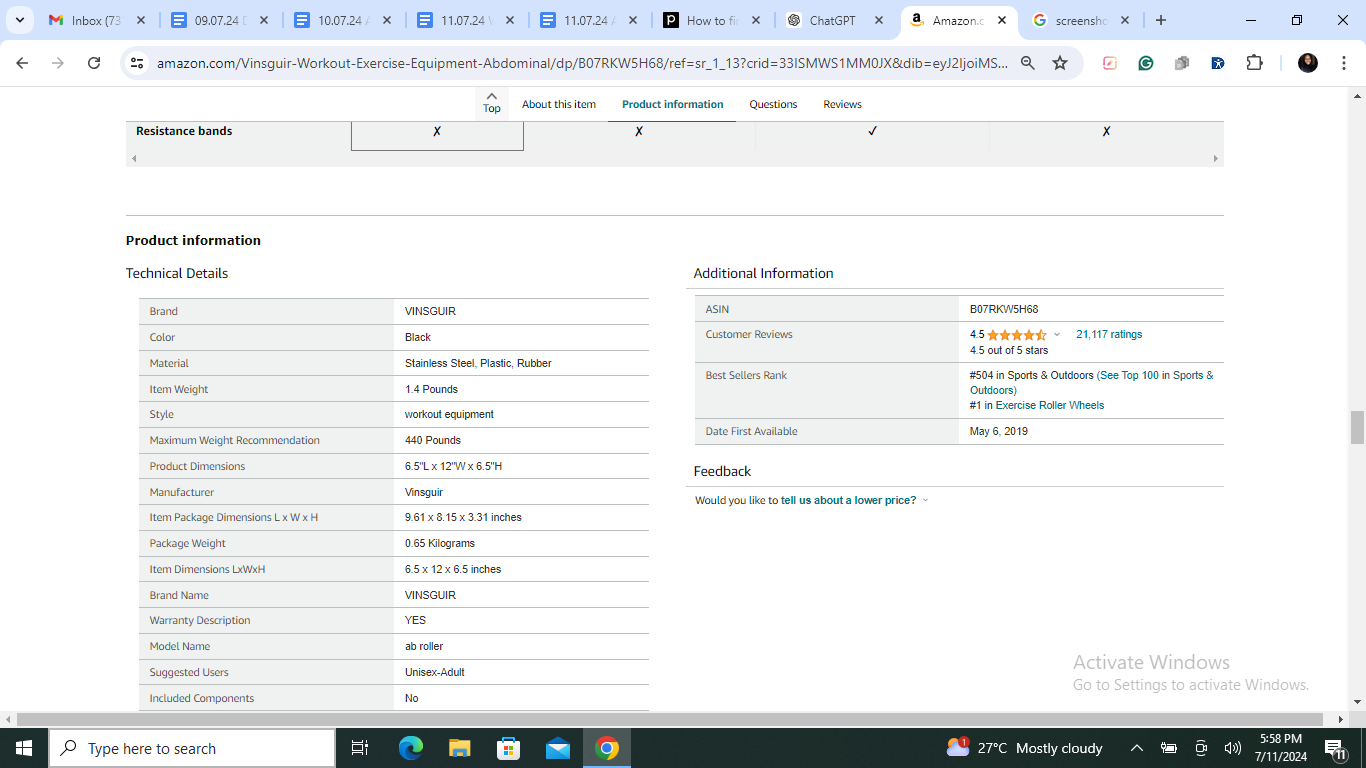
On the Amazon product page: Go to the product page and scroll to the "Product information" section. You'll find the BSR listed there, along with the category or subcategory it applies to.
Through third-party tools: Analytics platforms like Jungle Scout and Helium 10 provide BSR tracking alongside sales estimates, competitor analysis, and historical trend dashboards — far more useful than manually checking a product page once a day, since BSR can move multiple times within a few hours.
BSR vs. organic rank: what's the difference?
Amazon Best Sellers Rank is based purely on sales. Organic ranking is based on how well a product matches and performs against a specific search query.
Ranking well on BSR doesn't guarantee strong performance for a given keyword, and vice versa — a product can hold a strong (low) BSR while still ranking poorly in search if its listing isn't optimized for the keywords shoppers are searching.
To improve organic ranking, focus on relevant keywords in your title, bullets, and description. To improve BSR, focus on driving actual sales. The two reinforce each other over time, but they're not interchangeable levers.
How can sellers use Amazon Best Sellers Ranking?
Product research
BSR helps surface strong product opportunities. Rather than targeting an arbitrary number, compare BSRs of similar products within your target category — if several competitors all carry strong BSRs, that signals real demand (and real competition).
Estimating sales
Third-party sales estimator tools (Jungle Scout, Helium 10) use BSR alongside category-specific data to model an approximate sales range for a given rank. Treat these as directional estimates, not precise figures — the same BSR can represent very different unit volumes depending on category size and seasonality.
Competitor research
Compare your BSR against direct competitors. If they're consistently outranking you, that's a signal to revisit your listing, pricing, or advertising strategy.
How to improve your Amazon Best Sellers Ranking
Improving BSR ultimately comes down to one thing: increasing sales velocity relative to your competitors. Here's how:
Optimize your Amazon listing
Research keywords relevant to your product using a keyword tool, then work them naturally into your title, bullet points, and description. Pair strong keywords with compelling copy that sells the product at a glance.
Get good product reviews
Most shoppers make buying decisions based on prior reviews. Use Amazon's "Request a Review" button and compliant packaging inserts to encourage feedback — but the real driver is simply selling a good product that earns reviews naturally.
Price your products competitively
Pricing too high or too low can both cost you sales. Adjust your strategy to fit category norms, or use Amazon's Automate Pricing tool to stay competitive around the clock.
Stand out with high-quality images and video
Shoppers can't handle your product, so your visuals carry the weight. Invest in high-quality photography and product video — Amazon's A+ Content tools make this easier to execute at the listing level.
Use Amazon FBA
Fulfillment by Amazon shifts storage, shipping, and customer service to Amazon, and unlocks Prime eligibility — a meaningful sales lever, since Prime members show strong preference for Prime-eligible listings.
In summary
Amazon Best Sellers Rank is a useful, real-time signal of category-relative sales performance — not a universal benchmark, and not a stand-in for organic search ranking. Use it for product research, competitive tracking, and directional sales estimates, and pair it with keyword optimization, pricing strategy, and review generation to actually move the number. Need help building a BSR and ranking strategy for your catalog? ePlaybooks' Amazon account management team can help.

